Mac 上如何使用 SSH key
Introduction
SSH key 用来标识某台计算机被信任!一旦被信任,以后在这台计算机上进行的操作就不需要输入你账户的密码,可以理解为令牌,拿着令牌就可以做事,当然权限是可控制的!SSH key 是部分平台的,也就说今天举例的 MAC 系统可以用,经常使用的 Windows 也可以用,Linux等系统均可,因为说白了就是使用了一种加密方法,计算机生成了一对密钥;一个公钥,一个私钥,公钥当然就是公开使用的,一般会用于第三方平台,私钥是保留在计算机里的,因此在操作的时候只需公私钥配对即可,只要配对就认为是信任的计算机所为,就可以继续操作!今天以 SSH key 方式访问 github 举例…
使用场景
- 免密码登录远程服务器
- 免密码推送、拉取 git 远程仓库
比如我的博客使用的是 git page,说白了就是一个特殊的 github 仓库而已;本地生成站点之后,就需要 push 到 github,为了不用每次都输入用户名和密码,可以配置 ssh key,然后把远程仓库地址设置为 ssh 格式即可。
工作时虽然使用的是内部的 git 托管服务器 git lab,但使用方式跟 github 也没啥不一样的,同样支持配置 ssh key。
查看本地 ssh 密钥
ssh 公钥默认存放在 ~/.ssh 目录下,因此可以 ls 查看下:
1
2
3
4
5
6
7
8
9
10
11
12
13
ls ~/.ssh

如果曾经使用过 GitHub 客户端的话,应该是这样的:
-rw-------   1 matt  staff  1766  3 11  2015 github_rsa
-rw-r--r--@  1 matt  staff   405 10 18 17:31 github_rsa.pub
-rw-r--r--   1 matt  staff  1595  7  2 01:33 known_hosts

也有可能是这样的:
-rw-------  1 matt  staff  3243  8 20 00:15 id_rsa
-rw-r--r--  1 matt  staff   742  8 20 00:15 id_rsa.pub
-rw-r--r--  1 matt  staff   803  8 20 09:38 known_hosts

只不过是文件名的前缀不同罢了;
如果 ssh 已经添加到 github 了,那么可以通过 ssh -T git@github.com 验证下:
1
2
3
4
还没添加:
Permission denied (publickey).
或者:
Hi debugly! You've successfully authenticated, but GitHub does not provide shell access.
如果本地没有可用的 ssh key,或者你不想用之前的,或者想让之前的实效,那么你可以全部删掉,然后重新生成即可。
生成新的 SSH Key
使用 ssh-keygen -t ed25519 -C "xx@yyyzzz.com" 生成,这里的 “xx@yyyzzz.com” 替换成你的邮箱或者随便写都行,没限制的,最好起个能分的清楚的名字,有可能你有多个电脑,配置了多个 key。
输入上面的命令后,接下来连续 3 次回车就好了,具体细节是:
- Enter file in which to save the key (/Users/matt/.ssh/id_rsa): 文件存放位置,默认(~/.ssh)
- Enter passphrase (empty for no passphrase):我这里无需设置密码,直接回车
- Enter same passphrase again: 再次输入密码回车
这是我执行的结果:
1
2
3
4
5
6
7
8
9
10
11
12
13
14
15
16
17
18
19
20
21
22
bogon:~ matt$ ssh-keygen -t ed25519 -C "matt@home.mbp"
Generating public/private rsa key pair.
Enter file in which to save the key (/Users/matt/.ssh/id_rsa):
Created directory '/Users/matt/.ssh'.
Enter passphrase (empty for no passphrase):
Enter same passphrase again:
Your identification has been saved in /Users/matt/.ssh/id_rsa.
Your public key has been saved in /Users/matt/.ssh/id_rsa.pub.
The key fingerprint is:
SHA256:GzJ1j3gh0ws/IwF/KMQwoIvHhmnoPPW/v+w+pmDmSFo matt@home.mbp
The key's randomart image is:
+---[RSA 4096]----+
|  ..ooo          |
| .   o.o o       |
|.     . O =      |
|o=     o X =     |
|*.+.  o S B .    |
|+o. .  o = o     |
| + E =  .        |
|  = = o .o       |
| . . . +B*o      |
+----[SHA256]-----+
- 添加到 ssh-agent
ssh-add ~/.ssh/id_rsa : Identity added: /Users/matt/.ssh/id_rsa (/Users/matt/.ssh/id_rsa) 即使不操作这一步,一般也没问题的。
如果英文不错,那么可以直接去看 github 官网提供的文档: Generating-ssh-key .
Github 账号添加 SSH key
- 将公钥复制到剪切板
pbcopy < ~/.ssh/id_rsa.pub 或者 cat ~/.ssh/id_rsa.pub | pbcopy
登录 Github 账号,点击 Setting:
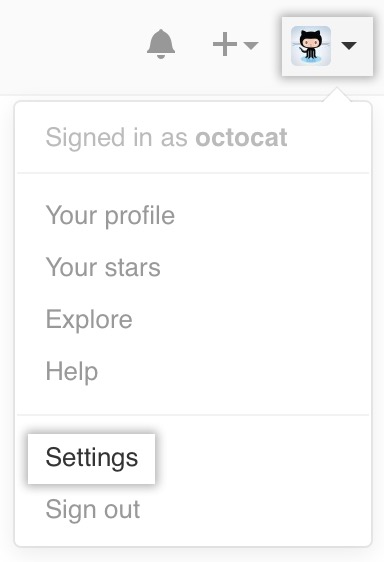
点击左侧的 SSH keys:
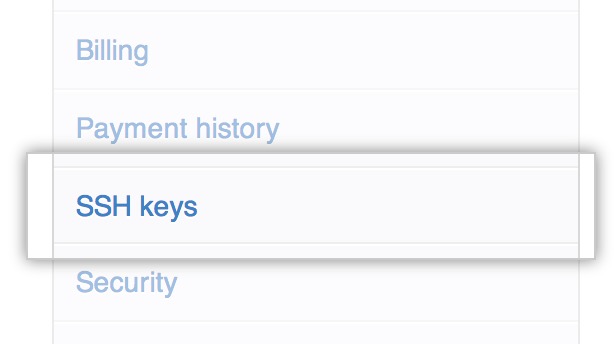
点击 Add SSH keys:

直接将公钥复制到输入框里面,一般 title 会自动生成:
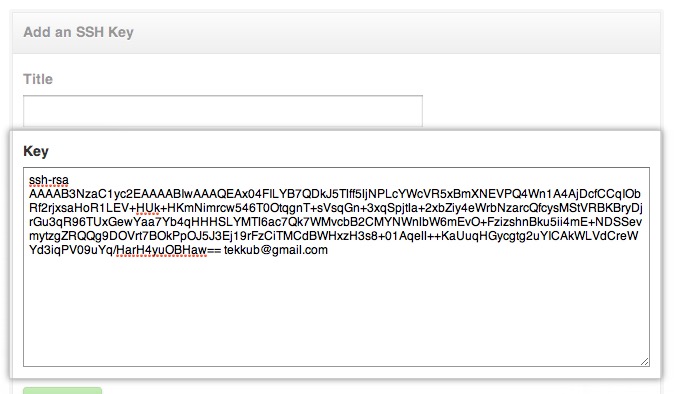
点击 Add key 即可:

- 添加到 github 后检查下 ssh key 状态
ssh -T git@github.com
应该看到如下内容:
1
2
3
The authenticity of host 'github.com (192.30.252.130)' can't be established.
RSA key fingerprint is 16:27:ac:a5:76:28:2d:36:63:1b:56:4d:eb:df:a6:48.
Are you sure you want to continue connecting (yes/no)?
因为这是第一次使用,没有 IP 记录,因此输入 yes 即可;
1
2
Warning: Permanently added 'github.com,192.30.252.130' (RSA) to the list of known hosts.
Hi debugly! You've successfully authenticated, but GitHub does not provide shell access.
看到你 Github 的用户名后就表示成功了!
体验免密码
- git clone git@github.com:debugly/NeedUpdate.git
1
2
3
4
5
6
7
Cloning into 'NeedUpdate'...
remote: Counting objects: 149, done.
remote: Compressing objects: 100% (98/98), done.
remote: Total 149 (delta 42), reused 149 (delta 42), pack-reused 0
Receiving objects: 100% (149/149), 10.30 MiB | 16.00 KiB/s, done.
Resolving deltas: 100% (42/42), done.
Checking connectivity... done.
Permission denied (publickey)
1
2
3
4
5
6
7
git clone git@github.com:xxxx/yyyy.git
Cloning into 'yyyy'...
git@github.com: Permission denied (publickey).
fatal: Could not read from remote repository.

Please make sure you have the correct access rights
and the repository exists.
确实没有将公钥配置到 git 服务器上,那必然是这个结果,但如果已经配置好了仍旧遇到这个问题,就比较难排查,我经历过两次:
1、更换远端 git 服务器,配置完 ssh key 后第一次使用新的服务器,服务器的公钥没有加到 known_hosts 里,通常情况下是不需用主动添加,可以通过下面的命令进行验证 ssh 连接的有效性:
1
2
3
4
ssh -T git@github.com
Hi debugly! You've successfully authenticated, but GitHub does not provide shell access.
ssh -T git@xxx.yyy.com
Welcome to GitLab, @debugly!
如果连接正常会输出类似于上面的欢迎日志,我遇到过不正常的:
1
2
3
4
5
6
ssh -T git@xxx.yyy.com
The authenticity of host 'xxx.yyy.com (190.118.40.35)' can't be established.
ED25519 key fingerprint is SHA256:jifls324j3jgfdger00IJ@#Jb/t9UIEIKEU.
This key is not known by any other names.
Are you sure you want to continue connecting (yes/no/[fingerprint])? yes
Warning: Permanently added 'xxx.yyy.com ' (ED25519) to the list of known hosts.
此时输入 yes 回车就行了!这是首次通过 SSH 连接时验证服务器身份的提示,我们团队当时只有一个人遇到了。
另外,可以增加 verbose 日志协助排查问题:ssh -vT git@xxx.yyy.com
2、使用了不支持 rsa 加密算法的 ssh 客户端导致的
这种情况只有早些年使用 rsa 算法生成公私钥对的人会遇到,用户从公司领取新的 Windows 电脑后,开始安装 Git For Windows 客户端,默认情况下安装时会使用内置的 OpenSSH 客户端,问题就出在这里,OpenSSH 在 v8.8p1 默认不再支持 SHA-1 算法了,导致 Git For Windows 从 2.33.1 开始使用之前创建的 rsa 密钥无法连接到 Git 服务器。
因此可以尝试使用低于 2.33.1 的安装包,或者安装时选择使用外部的 OpenSSH 客户端,然后自己安装一个早于 v8.8p1 的版本。
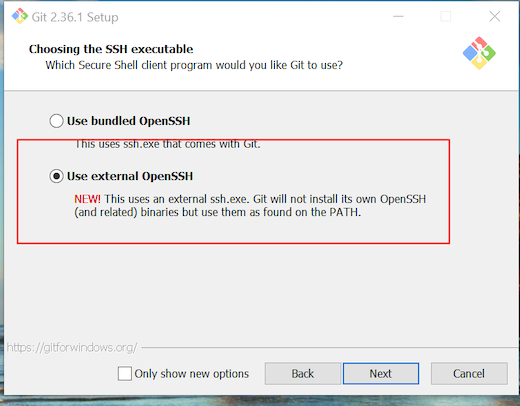
推荐使用 ed25519 加密算法重新生成一对公私钥,现在默认情况下 ssh-keygen 使用的就是 ed25519 加密算法。
还有一种办法是修改 ssh 的配置,在%UserProfile%/.ssh下新建config文件:
1
2
Host *
                      PubKeyAcceptedKeyTypes +ssh-rsa
Mac 用户在升级到 13 系统时,也会遇到这个问题,可以修改 ssh 的配置文件:/etc/ssh/ssh_config 也可以使用 ed25519 加密算法重新生成。
Comments powered by Disqus.